Where a size came from
Click a run and see its length, the sheet's scale, the service, and where the size was read: the tag on the plan, the equipment schedule or the riser diagram.

Duct insulation takeoff & estimating
Upload the mechanical set. InsulEngine measures and sizes ductwork, applies your insulation costs, and gives you marked-up drawings and a takeoff spreadsheet to review. Cover supply, return, outside and exhaust air, including outdoor jacketing.
Start My Free Trial Watch a Sample Takeoff7 days · 5 estimates · No credit card · Any email
Start with a job you have already bid and compare the results.
A takeoff from upload to output, on a public sample plan set. Nothing to sign up for.
Drop in the drawings as one PDF or several, and the spec if you have it. Pick the systems you insulate. The plan sheets are found for you.
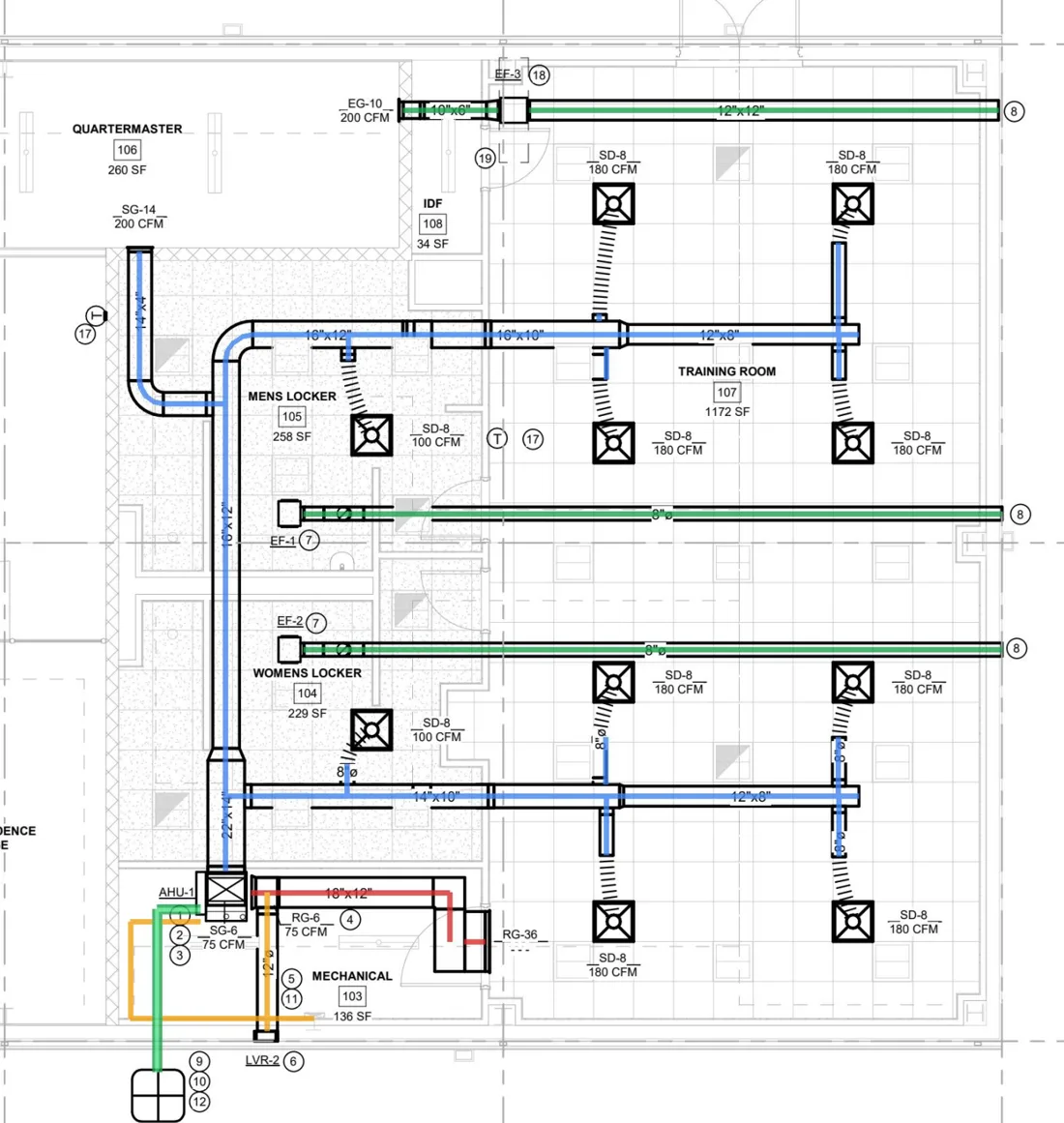
Each measured run is drawn on its sheet with its service and size, colored by system, like the sample here.
A run with no size anywhere on the set is held back and listed, with the feet it would add, so you decide it instead of finding a guess in the total.
Drag a run or set a size by hand and the feet, square feet and price update on the spot. Then download the estimate, the takeoff spreadsheet and the marked-up drawings.
Upload the same drawings, choose your insulation systems, and compare the quantities with your original takeoff. Review flagged items and use your costs to check the estimate.
Start My Free Trial7 days · 5 estimates · No credit card
Not covered: Gas piping (never insulated), existing pipe and duct shown for reference, and fabric duct (listed at $0 with the reason). Drawings must be PDF, vector or scanned; one file or several. CAD files (DWG, Revit) aren't read.
Trace quantities back to the drawing. Review the source of a size and resolve items the drawings do not settle before you bid.
Click a run and see its length, the sheet's scale, the service, and where the size was read: the tag on the plan, the equipment schedule or the riser diagram.
Pipe or duct with no size on the set is held back and listed with the footage it would add, and the estimate tells you how much is missing, instead of pricing a guess.
Measurement and totals are deterministic: the same drawings and settings give the same number every time.
Every change you make moves the bid on the spot and is kept with who made it and when.
Use your material prices, labor productivity, waste and markup. Import your cost spreadsheet or edit the cost book in place. An import accepts Excel, CSV, PDF, Word or a photo of a price sheet; each line is matched to an item, and you see every price that would change, with the old and new value, before you apply it. Undo is one click.
Upload the revised set and inspect which sheets changed and how the changes affect the bid. Sheets pair by drawing number, so an inserted or renumbered page doesn't throw off the rest, and the new takeoff is a new version next to the old one.
7 days and 5 estimates, no credit card, any email. An estimate is one project taken off; revisions and reruns of that project are free.
Your projects and estimates stay readable and downloadable. New takeoffs stop until the account is on a paid plan. Nothing is deleted.
Priced per company. Ask from inside the app (Request upgrade) or at info@insulengine.com and we'll send the plan and price before you commit.
7 days, 5 estimates, no credit card.
Start My Free Trial Book a 20-Minute DemoBook a 20-minute demo and we'll walk through a bid set you choose. No drawings needed to ask.
Start My Free Trial7 days, 5 estimates, no credit card. Any email.
Run a job you have already bid and compare the quantities with your original takeoff. Every quantity traces back to the drawing it was measured from, and items the drawings don't settle are flagged for you. There is no blanket accuracy figure, because one measured on our drawings wouldn't tell you what it does on yours.
Yes. Import your cost spreadsheet (Excel, CSV, PDF, Word or a photo of a price sheet; each line is matched to an item and you see every change before it is applied, with undo) or edit the cost book in place. Material prices, waste, labor productivity and markup are yours. Until you add yours, starter prices are used and labeled as starter prices.
The scope, the specification decisions, anything flagged as unresolved, the markup and the final bid. InsulEngine measures, sizes and prices; the decisions that change what you bid stay with you.
An estimate priced on your cost book (download as Excel or CSV), a takeoff spreadsheet (Excel) and the marked-up drawings (PDF), with every run drawn on the sheet it came from.
Only your company and the people you invite. InsulEngine staff open a project only through a support session with a stated reason, which is recorded. See the privacy policy.
Each project whose drawings you take off uses one of the 5. Revisions, reruns and reprices of the same project don't use another. A run InsulEngine support starts for you doesn't count.
Projects and estimates remain readable, and you can still download them. New takeoffs stop until the account is on a paid plan. Nothing is deleted.
No. Models are used to read documents (plans, schedules, notes, the spec) and never to measure: lengths and square feet are computed from the drawing at its scale, deterministically. Agreement between readings is treated as evidence, not proof, and unresolved items go to a person. How it reads PDF plans.
Processing time: across 84 production runs in the three weeks to October 20, 2026, the median was 17 minutes from upload to a finished takeoff ready for review, on a median 12-sheet set. Larger sets take longer, and your review time is extra and varies with the job.
Other trades: Mechanical insulation estimating · Pipe insulation takeoff